Machine Embroidery Tips for Newbies

How-to-Hoop-for-Machine-Embroidery-the-fun-part

You’ve invested in an embroidery machine and now it’s staring you in the face. Where to start? Here are what I hope are a few helpful tips from someone who has been where you are now before.

1. Relax
Being nervous when diving into a new craft is understandable, especially when it involves a major piece of equipment. But what is the worst thing that can happen, really? We guarantee you’ll make a few messes before you turn out a masterpiece, so this is a good time to get comfortable with that and invite your sense of humor to the party.

2. Start small
One of the fastest ways to sabotage yourself is to start off with a project that is not rated for novices or beginners. So slow down there, cowboy! Start small and easy, then progress to more challenging techniques as your skills grow.

3. Take notes
Make your own “recipes” for machine embroidery. Grab a notebook and keep records of what you’ve tried and how things went. Document the stabilizer you used, thread types and colors, fabric type/blend, any machine adjustments you made and anything else that may help you either replicate or improve the design next time. Better yet, keep these notes on your phone or computer where it’s easy to include photos.

4. Sew before you shop
It’s easy to get carried away by the excitement of a new craft and spend a lot of money on things that really are not necessary. All you need to get started is a machine/hoop, scissors, thread, fabric, stabilizer and a design. There are some great designs out there that are either free or very inexpensive. Check out the site I usually get mine from here. Then get some stitching time under your belt and do some research before investing in extras.

PowerPoint vs. Keynote: Which is the better choice for you?

bus_presentationWith the rise of the iPad and its increasing ability to be used as a productive tool and not just a novelty, Microsoft’s PowerPoint is losing its grip a little as the standard go to presentation software. One of its rising competitors is Apple’s own Keynote. Already a standard install on a Mac computer, those who own an iPad, or even an iPhone, and have activated their iCloud account can even access Keynote from a Windows based PC, making its use available to almost anyone. But is there any advantage to leaving behind the utility that so many of us have practically grown up with simply to try something new?

When comparing PowerPoint and Keynote, which is better for an individual to choose to create a presentation in depends very much upon what is most important to them. Are you most interested in creating an exciting, dynamic presentation with a little extra ‘pizazz’ or is it more important that the presentation be easily shared? Which program you choose depends on the answers to these kinds of questions.

“I want the program that is easiest to use”

In terms of basic functionality, PowerPoint and Keynote are actually fairly similar. The buttons and tabs have slightly different labels but they are, for the most part, located in similar spots within the basic interfaces and if you know PowerPoint Keynote is not hard to figure out and vice versa.

As Apple is known for their commitment to user friendliness there are some aspects of Keynote that are definitely ‘easier’ to use. For example, if you need to resize an image in PowerPoint it is essential that as you do so you remember to hold the shift key down to prevent it from distorting. In Keynote, all you do is drag the image to the desired size and the proportions are still maintained automatically.

There are more than a few of little differences like that example and for a seasoned PowerPoint user to have them keep cropping up when using Keynote can quickly drive them crazy and slow their productivity. Therefore if ease of use is your biggest concern you may be better off sticking to what you know best.

“I want to create a cool looking presentation”

When it comes to the prize for ‘cool’ in general, Keynote wins over PowerPoint every time. In terms of aesthetics and design Keynote is well ahead of its much older competitor. Presentations created in Keynote are simply more modern looking and offer more design flexibility, especially in terms of type positioning and the insertion of multimedia objects. If your main goal is to wow with visuals, then there is little doubt that Keynote has the edge.

“I want to be able to share my presentation widely and easily”

Keynote presents the problem that Mac users have been dealing with right from the start; most of the world still uses Windows. As much as Apple evangelists might hate it, 61% of the computers in the world are Windows based while only 10% are Macs (the rest tend to be Linux based but those are rarely found in use in basic businesses) Therefore, Keynote users have to deal with the fact that everyone needs to be able to open the presentation if it is to be shared electronically and because Apple are so fond of proprietary everything that can be a problem.

You can save a Keynote presentation as a PowerPoint file but often a lot is lost in translation, literally and what looked great on a Mac or an iPad can look like a jumbled mess on a PC. Saving the file as a PDF instead may be one solution, but that is of little use if you wanted the presentation viewed slide by slide as intended.

In the end, which of these presentation softwares you choose is a very personal decision based on your audience, your hardware and the way your want to share your work and those things may change from presentation to presentation. Both however are great options and becoming familiar with Keynote as well as PowerPoint really would be a good idea.

Tip of the Day: PowerPoint is not the only software choice for presentations. Consider trying out other options like Keynote to see which suits your needs best.

Originally published on Quora.com

What a Bad Logo Will Do For Your Brand

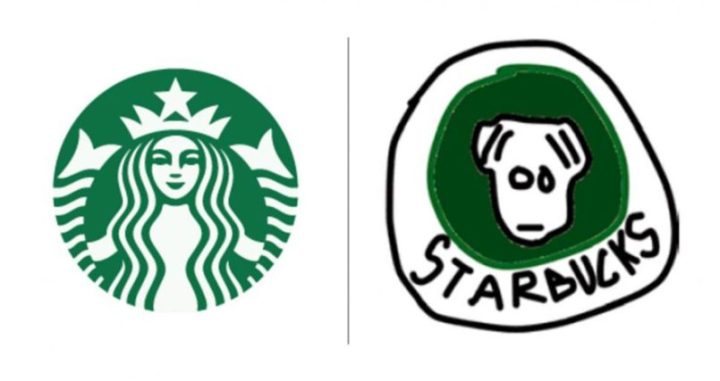
150-tried-drawing-famous-logos-from-memory-and-the-results-are-hilariously-bad-805x427

However large or small your company, however long you have been in business, your logo is a hugely important part of your brand. Think Nike, McDonalds, Burger King, Coca Cola. Iconic logos that the world recognises.

I’ll take another tack here though, as a graphic designer. There are so many questions here on Quora about how to get a ‘good free logo’ or a ‘good cheap logo’. It’s sad because these people obviously have no clue how much a bad logo can hurt their brand.

What’s a bad logo? Here are some of the biggest mistakes you can make:

The DIY Logo — Yes, you can create your own logo using some very basic software tools that are actually common features on most people’s desktops. Programs like Photoshop can be used to create logos of all kinds and there are lots of free Photoshop tutorials out there. Should be easy right?

But just because you can do something does not always mean that you should. Personally I know, in theory, how to throw the perfect fastball. I’ve watched all the videos, studied all the greats. However I have no doubt that should I turn up at Arlington to offer my services to the Rangers I’d be laughed off the field.

The same logic can be applied to logo design. If you are not a trained graphic designer, all the software tutorials in the world are not going to help you become one overnight and produce a professional quality log worthy of representing your brand.

Clip Art and Stock Images — If you decide to cut corners, and costs, by piecing together a logo using clip art and stock images you are immediately setting yourself up for failure. That clip art picture that appeals to you is probably already in use by dozens of other people and if that image has appealed to you because it seemed to fit your niche than you can bet someone else in the same industry had that thought already and is already using it on their business marketing materials. So now not only do you have a rather sloppily designed logo but also a very unoriginal one as well.

Going Cut Price — You contacted a couple of graphic designers but then you found someone online who says they will create you a “professional standard” logo for an eighth of the price everyone else was quoting you. Sounds too good to be true right?

Well that is because, chances are that it is. There’s usually a reason these designers are charging such low prices: they’re skimming on the research and brainstorming that should be involved with creating a personalized logo. They reuse and recycle a set of standard design ideas that while they may be visually quite interesting are not a real representation of your brand.

You Ask Designers to Create on Spec — You put an ad up online asking local graphic designers to send you their ideas for a logo for your business so that you can choose the one you like best. Maybe you even turn it into a fun little competition (‘get a lifetime’s supply of free hot sauce if we choose your design as the logo for Hottie Hot Sauces Inc.) Cool idea, not.

A good graphic designer may be looking for new clients but not ones who want them to trade their work for the possibility that they may eventually be paid for it. The kind of entries you are likely to get from this kind of “spec contest” are more likely to come from twelve years olds with a Paint program and a thing for spicy food than they are professional graphic designers.

Not Getting Feedback Before you Go to Print — Feedback from colleagues, business associates and yes, clients if you already have some, is a very important part of the logo design process and if you don’t solicit those options you could shoot yourself in the foot. Just ask The Gap.

About ten years ago The Gap decided to take the logo it had had for over twenty years and change it. The iconic blue and white logo was to be replaced by a black version that took everyone by surprise. And guess what, almost everyone hated it. The company received a slew of complaints and criticism from customers who demanded the return of the old design, as well as from the graphic arts community who just didn’t like it.

Thousands took to social media channels to demand the company return to the classic blue box with the white logo. They hated the change and many even threatened to boycott the store if the new logo was implemented. After a week the company relented and announced that the old logo is going nowhere.

Gap is a big company. They work with a top notch New York graphic design firm. In theory their new logo was great. But they forgot to ask anyone else what they thought about it. Don’t make the same mistake. However much you love the new logo solicit the opinion of others who know your business before you sign off on that final proof.


Originally published at www.quora.com.